Write the app.
Worker runs it.
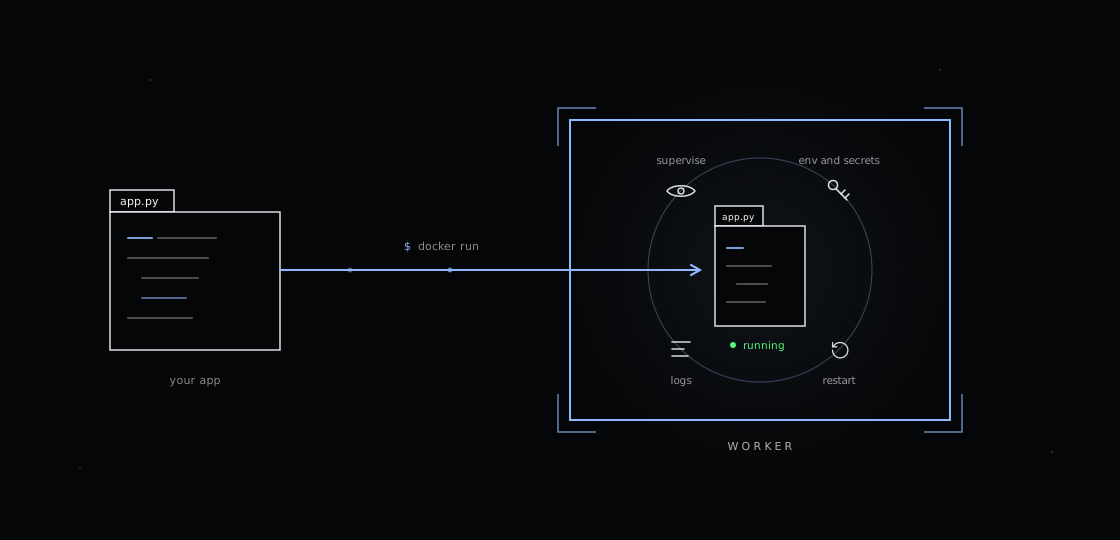
Bring a plain script in any language. Worker supervises the process, feeds it config and cloud secrets as ordinary environment variables, restarts it when it crashes, and gives you one CLI for logs and status. No Dockerfile, no SDK, no supervisor config. Every command on this page was run and verified against the published image.
# one service file, one config file, one run
$ cat .config/worker/services.yaml
services:
- name: "watcher"
command: "python3 /home/udx/app.py"
autostart: true
autorestart: true
$ docker run -d --name my-app -v "$(pwd):/home/udx" \
usabilitydynamics/udx-worker:latest
$ docker exec my-app worker service list
NAME STATUS PID UPTIME
✓ watcher RUNNING 111 0:00:14
$ docker exec my-app worker service logs watcher
watcher starting, interval=30s
udx/worker has 8 stars
One unedited take through everything on this page: how a volume mount carries your code into the container, what isolation the runtime gives you, how services are supervised inside worker - and then an AI agent using those same properties to take the app from a heartbeat script to a live Express API.
The entire human input to the agent: "we have a worker node container up that's volume mounted to this folder. make this app do something with a web server" - and later, "use express".
docker inspect shows the whole
contract: one bind mount, your folder to /home/udx, read-write.
Edit on the host and the file is already inside; the workspace is the deployment.
The same inspect shows the boundary: processes run as the non-root
udx user, kernel paths like /proc
and /sys are masked or read-only, and the app can only see what
you mounted.
docker logs shows the runtime
init: config, then secrets, then the process manager. Inside the container,
worker service list shows the app supervised and RUNNING -
that is services.yaml at work.
Because all of the above holds, one sentence of intent is enough:
the agent finds the container and mount, rewrites app.js,
deploys with worker service restart, and proves the result
with curl before reporting back.
$ docker exec worker-demo-node bash -lc 'worker service restart node-app 2>&1;
sleep 1; worker service list 2>&1 | tail -5; echo ---;
curl -s http://localhost:8080/ ; curl -s http://localhost:8080/health; echo'
udx@c08b3a9c85f4:/usr/src/app$ curl localhost:8080
{
"app": "node-app",
"mode": "demo",
"node": "v24.18.0",
"host": "c08b3a9c85f4",
"uptime_s": 37,
"requests": 3,
"path": "/"
}
mode=demo in that JSON came from worker.yaml; today the same endpoint also
returns the fingerprint of a secret resolved from AWS Secrets Manager. The agent never touched a
credential. One honest caveat the agent called out itself: the container publishes no host port,
so the API is reachable in-container (or add -p 8080:8080 at docker run).
Write ordinary Python. Declare config in worker.yaml and the
process in services.yaml. Mount the folder and run. That is
the whole workflow.
import os, time, json, urllib.request
API_URL = os.environ.get("API_URL")
INTERVAL = int(os.environ.get("POLL_INTERVAL", "30"))
def check(url):
with urllib.request.urlopen(url, timeout=10) as r:
return json.load(r).get("stargazers_count")
if __name__ == "__main__":
print(f"watcher starting, interval={INTERVAL}s", flush=True)
while True:
try:
print(f"udx/worker has {check(API_URL)} stars", flush=True)
except Exception as e:
print(f"error: {e}", flush=True)
time.sleep(INTERVAL)
kind: workerConfig
version: udx.io/worker-v1/config
config:
env:
API_URL: "https://api.github.com/repos/udx/worker"
POLL_INTERVAL: "30"
kind: workerService
version: udx.io/worker-v1/service
services:
- name: "watcher"
command: "python3 /home/udx/app.py"
autostart: true
autorestart: true
$ docker run -d --name my-app \
-v "$(pwd):/home/udx" \
usabilitydynamics/udx-worker:latest
$ docker exec my-app worker service list
NAME STATUS PID UPTIME
---- ------ --- ------
✅ watcher RUNNING 111 0:00:14
$ docker exec my-app worker service logs watcher --tail 2
watcher starting, interval=30s
udx/worker has 8 stars
No Dockerfile. The base image already has the runtime; your code mounts in.
No config library. Your app reads os.environ. Worker put the values there before your code started.
No supervisor config. Five lines of services.yaml replace init scripts, PID files, and restart logic.
No log plumbing. Print to stdout; worker service logs and errors collect it per service.
Any language works the same way: if it runs from a command line, worker can supervise it. Python ships in the base image; Node.js and PHP ship in the official child images.
Because your workspace is mounted, developing inside worker feels like developing anywhere else, except crashes, secrets, and multiple processes are already handled.
Edit the file on your host, restart the service. New code is live in about two seconds. No image rebuild, no container restart.
# edit on the host
$ vim app.py
$ docker exec my-app \
worker service restart watcher
✅ watcher (RUNNING) - uptime 0:00:02
$ docker exec my-app \
worker service logs watcher --tail 1
udx/worker has 8 stars
This test app exits on purpose every four ticks. With
autorestart: true, the supervisor brings it straight
back; run number three is already running while the crash log keeps the history.
# stdout
$ worker service logs flaky
run #3 tick 3/4
run #3 tick 4/4
$ worker service errors flaky
run #1 crashing on purpose
run #2 crashing on purpose
$ worker service list
✅ flaky RUNNING uptime 0:00:15
Reference a cloud secret in worker.yaml and your app
reads a normal env var. This app logs a fingerprint of a token that lives in Google
Secret Manager; the code never imports a cloud library.
# worker.yaml
secrets:
APP_TOKEN: "gcp/my-project/app-token"
# app.py
token = os.environ["APP_TOKEN"]
$ worker service logs app
app started,
APP_TOKEN fingerprint=96aa094881e9
worker.yaml defines environment variables and secret references
that are resolved at container startup. It is runtime config, not deployment config, and it never
holds cloud credentials.
kind: workerConfig
version: udx.io/worker-v1/config
config:
env:
APP_MODE: "worker"
AWS_REGION: "us-west-2"
secrets:
DB_PASSWORD: "aws/db-password/us-west-2"
API_KEY: "azure/kv-prod/api-key"
SIGNING_KEY: "gcp/my-project/signing-key"
References work in config.secrets, in
config.env values, and in deployment
environment variables. Resolved values are exported into the worker environment
and become available to services. AWS and Google Cloud resolution were validated
end-to-end against live secrets for this page; the Azure format is documented
in the repo.
Naming rule: references are parsed as exactly three slash-separated fields, so
secret names containing slashes (the common prod/db/password
convention) cannot be referenced. Use dash-separated names.
Values passed with -e or by the platform always win.
Resolved at startup, still ahead of file config.
Provider references resolved after auth exists.
Static defaults, injected as-is.
Verified: with APP_MODE: "worker" in worker.yaml and
-e APP_MODE="deployment-override" at run time, the
startup log reports "Detected [APP_MODE] in container environment,
using runtime value instead of config value" and the deployment value is used.
The worker never logs in to cloud providers. Provider auth comes from the platform: task roles and IRSA on AWS, managed identity on Azure, attached service accounts or Workload Identity on Google Cloud, or mounted credential files for local development.
If a secret reference cannot be resolved at startup, the container logs the provider error and exits with a non-zero status. It does not start services with missing secrets.
Opt-in, redacted evidence of the resolved runtime for CI and release pipelines
Set WORKER_RUNTIME_OUTPUT=true and the entrypoint
emits a redacted JSON contract on stdout while setup logs move to stderr. Secret values
never appear; their names are listed under redacted.
# Contract only: run a short command and exit
docker run --rm \
-e WORKER_RUNTIME_OUTPUT=true \
-v "$(pwd)/.config/worker:/home/udx/.config/worker:ro" \
usabilitydynamics/udx-worker:latest \
true > runtime.json
# Validate the artifact
jq -e '.env | type == "object"' runtime.json
jq -e '.redacted | type == "array"' runtime.json
{
"generated_at": "2026-07-16T00:20:47Z",
"paths": {
"worker_config": "/home/udx/.config/worker/worker.yaml",
"services_config": "/etc/worker/services.yaml",
"environment": "/etc/worker/environment"
},
"env": {
"APP_MODE": "worker"
},
"redacted": [
"TEST_SECRET"
]
}
services.yaml defines the processes that run inside the
container. It does not select the image or perform deployment; that stays with Docker,
Kubernetes, or your CI/CD platform.
kind: workerService
version: udx.io/worker-v1/service
services:
- name: "serviceA"
command: >-
bash -lc 'echo "starting $SERVICE_NAME";
exec /home/udx/bin/service_a.sh'
autostart: true
autorestart: true
envs:
- "SERVICE_NAME=serviceA"
- "LOG_LEVEL=info"
- name: "serviceB"
command: >-
bash -lc 'echo "starting $SERVICE_NAME";
exec /home/udx/bin/service_b.sh'
autostart: true
autorestart: true
envs:
- "SERVICE_NAME=serviceB"
- "LOG_LEVEL=warn"
NAME STATUS PID UPTIME
---- ------ --- ------
✅ serviceA RUNNING 137 0:00:07
✅ serviceB RUNNING 138 0:00:07
name
Unique service name used by all worker service commands.
command
A single command string. There is no args field; put arguments directly in the command.
autostart
Start the service when the container starts.
autorestart
Restart the process if it exits.
envs
Per-service KEY=value pairs. Do not put provider secret references here; those belong in worker.yaml.
# Inspect
worker service list
worker service status serviceA --format json
worker service config
# Control
worker service stop serviceB
worker service start serviceB
worker service restart serviceA
# Logs (stdout and stderr are separate)
worker service logs serviceA --tail 100 --follow
worker service errors serviceA --tail 100
Passing arguments: write them into the command string, for example
command: "/home/udx/bin/job.sh --mode=sync --retry=3".
Graceful shutdown, verified: worker service stop and
restart deliver SIGTERM and your handler runs to
completion. docker stop does not reach service
SIGTERM traps - stop services first when a clean teardown matters.
Every container ships with a worker command for inspecting
and managing the runtime. Run any command without arguments to see its help.
Manage supervised processes.
list · status · start · stop · restart · logs · errors · config · init
Inspect and manage environment variables and secrets.
show · set · unset · reload · status · resolve
Work with worker.yaml directly.
show · edit · locations · init · diff · apply · resolve
Disk, memory, and load checks with text or JSON output.
status [--format json]
Software bill of materials for system and Python packages.
generate · verify [--format json --type all]
Print the CLI version.
worker version
# Secrets are masked by default
$ worker env show --filter TEST_SECRET --format json
{
"TEST_SECRET": "********"
}
# Unmask explicitly when you really need the value
$ worker env show --filter TEST_SECRET --include-secrets
# Resolve a single provider reference ad hoc
$ worker env resolve gcp/my-project/api-key
# Where things live
$ worker config locations
Built-in config: /etc/worker/worker.yaml
User config: /home/udx/.config/worker/worker.yaml
Active config: ...
worker env reload and
worker config apply rerun the same
config, env, and secret resolution path used by the entrypoint. Use them after
authenticating with provider tooling inside the container, for example during
development or a runbook session. The auth command itself stays outside the worker;
this is not a login feature.
# after e.g. gcloud/az/aws auth inside the container
worker env reload
The CLI runs inside the container. From the host, prefix commands with
docker exec <container>.
The base image is intentionally minimal. When a workload needs extra tools, extend
usabilitydynamics/udx-worker in a child image
instead of changing the core runtime.
FROM usabilitydynamics/udx-worker:latest
# The base image runs as the non-root udx user.
# Switch to root for package installs, then back.
USER root
RUN apt-get update && \
apt-get install -y jq && \
rm -rf /var/lib/apt/lists/*
USER udx
Without the USER root / USER udx
wrapper, apt-get fails with
"Could not open lock file... Permission denied" because
the base image defaults to the unprivileged udx user.
Always drop back to udx after installing.
docker build -t my-org/udx-worker-custom:latest .
docker run --rm \
-v "$(pwd)/.config/worker:/home/udx/.config/worker:ro" \
my-org/udx-worker-custom:latest
Deployment is external to the worker. The host tooling picks the image, mounts the runtime configs, and supplies provider identity. The worker owns what happens inside the container.
Docker / Compose: mount .config/worker read-only, pass env vars with -e.
Kubernetes: project worker.yaml and services.yaml via ConfigMaps or Secrets; use workload identity for provider auth.
CI/CD: use the platform's federation (for example GitHub OIDC) to inject short-lived credentials, and capture the runtime output contract as a release artifact.
Official workload images built on this base:
PHP 8.4 with nginx + php-fpm already supervised as services
Node 24 runtime; runs the agent walkthrough above
Discover more via GitHub or the Docker Hub namespace.
The failure modes below were reproduced against the published image; the fixes are what actually resolved them.
# Container startup and entrypoint logs
docker logs <container>
# What is supervised and is it running?
docker exec <container> worker service list
docker exec <container> worker service status <name> --format json
# Service output, stdout and stderr separately
docker exec <container> worker service logs <name> --tail 100
docker exec <container> worker service errors <name> --tail 100
# Which configs are active, and what resolved?
docker exec <container> worker config locations
docker exec <container> worker service config
docker exec <container> worker env status
docker exec <container> worker env show --format json
# Disk, memory, and load inside the container
docker exec <container> worker health status
If any secret reference cannot be resolved, the entrypoint logs the provider error (for example "Failed to resolve secret for DB_PASSWORD") and the container exits non-zero without starting services. This is by design: services never start with missing secrets.
Fix: supply provider auth (platform identity or mounted
credentials) before startup, or remove the reference. Check
docker logs for the exact provider error.
GCP references are resolved with the gcloud CLI,
which does not read GOOGLE_APPLICATION_CREDENTIALS
for its own account. Setting only that variable still fails.
Fix: on GKE or Cloud Run use the attached service
account or Workload Identity. For local development, mount a gcloud config directory
and point CLOUDSDK_CONFIG at it.
Deployment environment variables always override worker.yaml.
The startup log tells you when this happens:
"Detected [NAME] in container environment, using runtime value
instead of config value".
Fix: remove the deployment override, or embrace it; that precedence is the intended way to vary environments without editing files.
The worker only reads /home/udx/.config/worker/worker.yaml
and services.yaml. A volume mounted to the wrong
path falls back to built-in defaults with no error.
Fix: verify with
worker config locations (shows built-in vs user
vs active config) and worker service config
(shows the file actually loaded).
The runtime contract is only emitted when
WORKER_RUNTIME_OUTPUT=true. In that mode stdout
carries only the JSON and all logs go to stderr, so
> runtime.json captures a clean artifact.
An empty file usually means startup failed first; check stderr.
Fix: validate with
jq -e '.env | type == "object"' and read the
stderr log for the underlying error.
"Could not open lock file /var/lib/apt/lists/lock, Permission
denied" means the layer ran as the default non-root
udx user.
Fix: wrap installs in
USER root ...
USER udx as shown in the child image section above.
Resolved secrets are effectively immutable for the life of a container.
worker env reload and
docker restart treat the persisted value as a
deployment override and skip re-resolution, and running services inherit environment
from the supervisor's boot snapshot. All paths tested against a live rotation.
Fix: recreate the container
(docker rm -f + docker run,
or a rolling redeploy on your platform). That is the only path that picks up the new value.
EXPOSE in the image does not publish anything.
Without -p at docker run,
an in-container server is reachable only via
docker exec <c> curl localhost:PORT or from
other containers on a shared network.
Fix: recreate the container with
-p 8080:8080 (or your port). To see what is
actually listening: awk '$4 == "0A" {split($2,a,":"); print strtonum("0x" a[2])}' /proc/net/tcp /proc/net/tcp6 - the image ships without ss or netstat.
Looking for deployment patterns? See the Runtime and Deployment Guide. Full reference documentation lives in the repo: github.com/udx/worker/docs, with runnable samples under src/examples.